- Phone number : 01 41 51 11 20
- clients@dbsonic.fr




1-DB Carplay - X Accessoires DB CarPlay
REF. : DBCAC06
Power cord for cigarette lighter socket, allowing you to power a CarPlay system with a camera or compatible dashcam via a Type-C connector.
• Input: 12V / 24V (vehicle socket)
• Output: 5V / 3A (device)
• Length: 350 cm
Usage:
Plug the cord into the vehicle's cigarette lighter socket (12V or 24V).
Only connect to a 5V compatible CarPlay system.
Compatibility:
• 5V devices
• Do not use with 12V devices (Type-C standard 12V CarPlay)
Important information (safety):
• This cable outputs 5V: always check the compatibility of your device.
• Improper use can be dangerous and may permanently damage your equipment.
• The Type-C connector does not guarantee universal compatibility.
dBSonic Tip:
Always check the technical specifications of your device before use.
Ideal for dBSonic CarPlay Ref: DB006 and DB007.
If in doubt, do not use the product.

1-DB Carplay - X Accessoires DB CarPlay
REF. : DBCAC05
Cigarette lighter power cord for powering a CarPlay system without a camera/Type-C converter.
• Input: 12/24V (vehicle socket)
• Output: 12V 2A
• Length: 120 cm
Use:
Connect the cord to the vehicle's cigarette lighter socket (12V or 24V).
Connectivity is only compatible with a 12V CarPlay system.
Compatibility:
• 12V devices
• Do not use with 5V CarPlay (standard Type-C): Dashcams, smartphones, tablets, etc.
Important information (safety):
• This cable outputs 12V: always check the compatibility of your device.
• Improper use may result in a power surge and permanent damage to your equipment. • Never connect a smartphone or any other TYPE-C device.
• The Type-C connector does not guarantee universal compatibility.
dBSonic Tip:
Always check your device's technical specifications before use. Ideal for CarPlay. dBSonic Ref: DB005. If in doubt, do not use the product.

1-DB Carplay - X Accessoires DB CarPlay
REF. : DBSP02
Simple 4-step installation:
1. Clean and degrease the dashboard surface with the included wipe.
2. Remove the protective film from the adhesive.
3. Position the mount and press firmly for a few seconds.
4. Allow the adhesive to set before use for optimal adhesion.
Package contents:
1 dashboard mounting bracket
1 cleaning wipe
Important information:
- Prolonged exposure to heat (dashboard in direct sunlight) may impair adhesion.
- Use a sunshade on the windshield to limit prolonged direct sunlight exposure.
- Adhesive performance may vary depending on materials and weather conditions.
- Product intended for interior vehicle use only

1-DB Carplay - X Accessoires DB CarPlay
REF. : DBSP01
Simple 3-step installation:
1. Clean and degrease the dashboard surface using the provided wipe.
2. Attach the plastic plate to a clean, dry surface using the 3M adhesive.
3. Attach the suction cup to the plate for optimal adhesion.
Package contents:
1 suction cup mount
1 adhesive plate (high-performance 3M adhesive)
1 cleaning wipe
Important information:
- Maximum weight capacity: 432 g
- Not suitable for the heavy dBSonic DB007 CarPlay.
- Do not exceed this weight to ensure safety and stability.
- Do not leave the suction cup on the window in direct sunlight and protect the mount from heat and sunlight when the vehicle is stationary.
- For best results, use on the dashboard

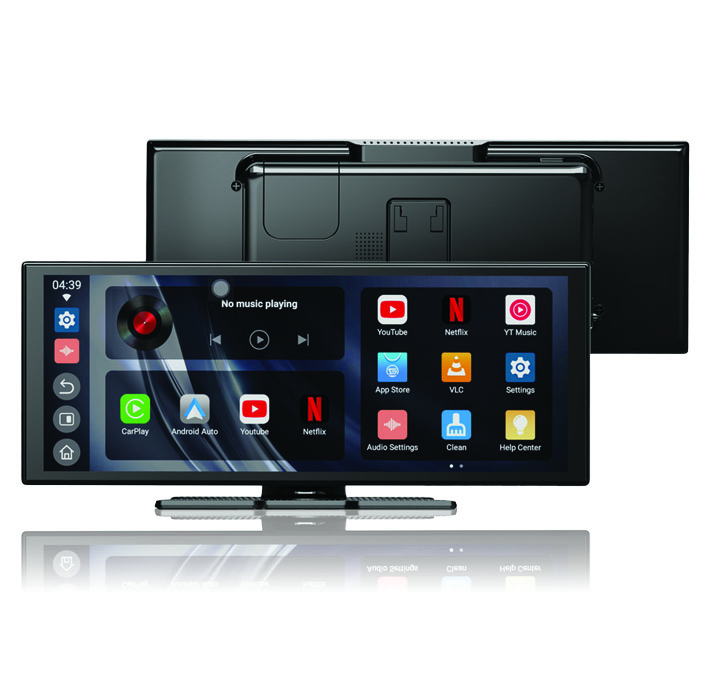
1-DB Carplay - DB Carplay
REF. : db007
Our DB007 lets you enjoy all the features of your smartphone while driving.
No need to remove your original car stereo. Simply place it, plug it in, and connect your smartphone.
In just a few seconds, you’re ready to enjoy all your apps, wirelessly or wired — and above all, effortlessly.
 01 41 51 11 20
 Contactez-nous
